


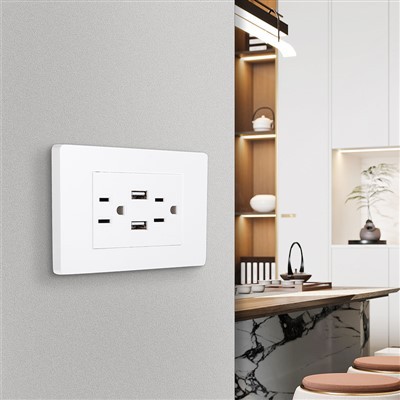
A USB plug socket is a type of wall socket that combines traditional electrical power with USB charging ports. These sockets are designed to provide a convenient way to charge electronic devices such as smartphones, tablets, and portable electronics directly from a wall outlet without the need for a separate USB charger.USB plug sockets typically have one or more USB ports built into them. The USB ports can supply power to devices using the standard USB charging cable that comes with most modern electronics. This eliminates the need for multiple chargers and allows for charging multiple devices simultaneously.
Benefits of USB Plug Socket
Convenience
USB plug sockets allow users to charge their mobile phones, tablets, and other USB-charged devices directly from an electrical outlet without the need for separate USB chargers.
Space Efficiency
By integrating USB charging functionality directly into the wall socket, users save space that would otherwise be occupied by standalone USB chargers.
Simultaneous Charging
Many USB plug sockets feature multiple USB ports, enabling the simultaneous charging of multiple devices.
Compatibility
USB outlets use a standardized USB interface, ensuring compatibility with a wide range of devices that charge via USB.
Power Adaptability
Modern USB outlets support different output voltages and currents, making them capable of charging various devices quickly and efficiently.
Built-In Surge Protection
Some USB plug sockets come with integrated surge protection that safeguards devices from voltage spikes.
Smart Charging
Certain high-end USB outlets have smart technology that detects the optimal charging speed for connected devices, enhancing charging efficiency and reducing wear and tear.
Energy Efficiency
USB outlets can reduce energy wastage by providing exactly the amount of power required for charging, unlike traditional power adapters that might consume standby power even when not in use.
Design Flexibility
USB plug sockets come in various designs that can match the aesthetic of a room, blending seamlessly into the décor.




Why Choose Us
State-Of-The-Art Technology
We use the latest technology and tools to deliver high quality services. Our team is well-versed in the latest trends and advancements in technology and uses them to provide the best results.
Expertise and Experience
Our team of experts have years of experience in delivering high quality services to our clients. We hire only the best professionals who have a proven track record of delivering exceptional results.
Quality Assurance
We have a rigorous quality assurance process in place to ensure that all our services meet the highest standards of quality. Our team of quality analysts checks each project thoroughly before it is delivered to the client.
One-stop service
We promise to provide you with the fastest reply, the best price, the best quality, and the most complete after-sales service.
Competitive Pricing
We offer competitive pricing for our services without compromising on quality. Our prices are transparent, and we do not believe in hidden charges or fees.
Customer Satisfaction
We are committed to delivering high quality services that exceed our clients' expectations. We strive to ensure that our clients are satisfied with our services and work closely with them to ensure their needs are met.
A USB plug socket is a type of electrical socket that provides a USB charging port in addition to the traditional power outlets. It allows you to directly plug in your USB-enabled devices for charging or data transfer.How it works is pretty simple. The USB plug socket has built-in circuitry that converts the electrical power from the mains into the appropriate voltage and current for charging USB devices. When you plug in your device's USB cable into the socket, the power is supplied to the device through the USB port.One of the benefits of using a USB plug socket is the convenience it offers. Instead of having multiple chargers for different devices, you can charge multiple USB devices simultaneously using a single socket. This helps reduce clutter and makes it easier to keep your devices charged and ready to use.USB plug sockets are commonly found in various settings, such as homes, offices, public spaces, and even in vehicles. They come in different designs and configurations, with some having multiple USB ports to accommodate multiple devices at once.It's important to note that not all USB plug sockets are created equal. The charging speed and compatibility may vary depending on the socket's specifications and the device's charging requirements. Some sockets may support fast charging technologies, while others may have a limited power output.When using a USB plug socket, it's always a good idea to refer to the socket's documentation or specifications to ensure it is compatible with your devices and meets your charging needs.

The number of USB ports on a typical USB plug socket can vary. It depends on the specific model and design of the socket. Some common options include having one, two, or even more USB ports.Single-port USB plug sockets are relatively common and are suitable for charging a single device at a time. They are often found in smaller spaces or when only one device needs to be charged simultaneously.Two-port USB plug sockets are more versatile, allowing you to charge two devices simultaneously. This is especially useful when you have multiple USB-enabled devices that need charging, such as a smartphone and a tablet.There are also USB plug sockets available with more than two ports, which can be handy in shared or high-device-use environments. These might have three, four, or even more USB ports to accommodate multiple devices.The number of USB ports needed depends on your individual charging needs. If you have multiple devices to charge regularly, having a socket with more ports can be more convenient. However, if you only need to charge one or two devices, a single- or two-port socket might suffice.It's important to note that besides the number of ports, other factors like the power output of each port and the overall charging speed can also vary among different USB plug socket models.
Are all USB plug sockets compatible with all devices
USB Standards
USB has evolved through several standards, including USB 1.x, USB 2.0, USB 3.x, and the most recent USB4. Each standard has different maximum data transfer rates and power delivery capabilities. A device designed for USB 3.x may not work with a USB 2.0 socket, although USB 2.0 sockets are usually backward compatible with USB 1.x devices.
USB Types
There are different physical types of USB connectors, such as USB Type-A, USB Type-B, Mini-USB, Micro-USB, and the newer USB Type-C. USB Type-C is becoming increasingly common because it is reversible and supports faster data speeds and higher power levels than previous types. However, not all devices use USB Type-C, and not all USB Type-C sockets are compatible with older USB types without an adapter.
Power Output
Some USB sockets may not provide enough power (measured in amps) for larger devices like tablets and laptops, even if the socket physically accepts the connector. Devices that require more power may not charge or may charge slowly when connected to a low-power USB socket.
Data Transfer Only
Some USB sockets are designed solely for data transfer and do not support charging functions. Conversely, some sockets may only support charging and not data transfer.
Software Compatibility
In rare cases, the operating system or software on a computer may not support certain devices connected via USB. This could be due to missing drivers or compatibility issues.
USB Power Delivery (PD)
USB Power Delivery is a specification that allows for increased power output and charging speeds. Not all USB sockets support USB PD, and devices that rely on USB PD for fast charging might not be compatible with non-PD sockets.

What Is The Maximum Power Output Of A Usb Plug Socket
The maximum power output of a USB plug socket depends on the specific USB standard it conforms to:
- USB 1.x: Early USB versions had a power output of 500 mA (milliamperes) at 5 Volts, equating to a maximum of 2.5 Watts (5V x 0.5A).
- USB 2.0: This maintained the same power specification as USB 1.x.
- USB Battery Charging (BC) Specification 1.2: This introduced a dedicated charging port (DCP) that allowed for currents up to 1.5A, providing 7.5 Watts (5V x 1.5A).
- Standard Downstream USB (SDUSB) with BC 1.2: These ports could deliver up to 2.1A, or 10.5 Watts (5V x 2.1A), when in DCP mode.
- USB 3.x: With USB 3.0, the power output was increased to 900 mA at 5 Volts, providing up to 4.5 Watts (5V x 0.9A). Later, with USB 3.1, the power output could reach 1.5A (7.5 Watts) or 2A (10 Watts) for standard downstream USB ports when using BC 1.2.
- USB Type-C: USB Type-C sockets with USB Power Delivery (USB PD) specification can deliver much higher power outputs, potentially exceeding 100 Watts (20V x 5A), depending on the negotiation between the device and the power source.
It is important to note that the actual power output of a USB socket can be limited by the source device's power supply or the USB charger itself. Additionally, some devices may negotiate less power to adhere to their own charging specifications or to protect the battery from overcharging. Always consult the specifications of both the USB socket and the connected device to determine the appropriate power delivery.
Are Usb Plug Sockets Safe To Use
USB plug sockets are generally considered safe to use when they are compliant with the relevant safety standards and installed correctly. Manufacturers design these sockets to meet international safety regulations, which include features to prevent electric shock, overcurrent, and overvoltage.
Here are some key aspects of safety regarding USB plug sockets:
Compliance with Standards: USB sockets must comply with standards set by organizations such as the International Electrotechnical Commission (IEC) and the USB Implementers Forum (USB-IF). These standards ensure that the devices are designed to be safe for consumer use.
Overcurrent Protection: Many USB sockets have built-in protection against overcurrent. If too much current flows through the socket, it will automatically cut off the power to prevent damage to connected devices or the socket itself.
Overvoltage Protection: Similar to overcurrent protection, overvoltage protection is designed to prevent damage caused by excessive voltage. It helps maintain a safe voltage level within the socket.
Insulation: Properly manufactured USB sockets have adequate insulation to prevent users from touching live parts. The plastic housing and covering materials are designed to keep the high-voltage components away from the user.
Quality of Manufacturing: The quality of manufacturing plays a crucial role in the safety of USB sockets. Cheap or counterfeit products might skip safety features and fail to meet the required safety standards, posing a risk of electrical shock or fire.
Installation: Proper installation of USB sockets is essential for safety. They should only be installed by qualified electricians who understand the necessary electrical codes and practices.
Use of Certified Products: Using USB sockets and chargers that have been certified by recognized safety organizations, such as Underwriters Laboratories (UL), adds an extra layer of safety assurance.
Regular Inspection: Users should regularly inspect any USB socket for signs of damage, such as frayed wires or loose connections, which could indicate a safety hazard.
What Is The Difference Between A Usb Plug Socket And A Traditional Power Socket
Functionality
Traditional power sockets provide a connection point for electrical appliances and devices that draw power directly from the mains electricity supply. USB plug sockets, on the other hand, are designed specifically for charging USB-compatible devices and transferring data. They typically convert AC (alternating current) from the mains supply to DC (direct current) that USB devices use.
Power Output
Traditional power sockets usually offer a higher power output compared to USB sockets. This is because they are meant to power a wide range of appliances that may require more wattage. USB sockets, however, are generally designed for lower power applications, such as charging smartphones, tablets, and other portable devices.
Connector Types
Traditional power sockets accept a variety of plugs that correspond to different countries and regions. They also come in different shapes and sizes, such as Schuko, British BS 1363, American NEMA 5-15, etc. USB sockets are standardized with a USB connector and are universally compatible with most USB devices, which use either USB Type-A, Micro-USB, USB Type-C, or other USB connector types.
Data Capability
While traditional power sockets only provide power, USB sockets can also transfer data. This feature is particularly useful for connecting peripherals like keyboards, mice, printers, external hard drives, and other USB-enabled devices to computers and other electronic devices.
Safety Features
Both types of sockets incorporate safety features to prevent accidents, such as overcurrent and overvoltage protections. However, modern USB sockets often include intelligent charging technology that recognizes the connected device and provides the correct amount of power to prevent overcharging or undercharging.
Installation and Usage
Traditional power sockets require professional installation and are subject to strict building codes and regulations. USB sockets, being lower powered, can sometimes be installed by homeowners without the need for professional assistance, although it is still recommended to follow safety guidelines and regulations.
Are USB plug sockets available in different voltages
USB plug sockets, also known as USB wall chargers or power outlets, are designed to convert the alternating current (AC) from a mains supply into direct current (DC) suitable for charging and powering USB devices. These sockets are standardized around a global DC voltage of 5 volts, which aligns with the USB specification. This universal 5V output is consistent across various countries and regions, ensuring compatibility with a wide range of USB-powered gadgets, including smartphones, tablets, cameras, headphones, and more.
The standardization of USB plug sockets around 5 volts simplifies international travel and eliminates the need for multiple chargers tailored to different voltages. Devices equipped with USB charging ports can typically handle a voltage input within a certain range, commonly between 100-240 volts AC, making them compatible with the majority of world power grids. When plugged into a USB outlet, these devices rely on the internal circuitry of the charger or USB socket to convert the AC to 5V DC.
The 5V DC output of USB sockets is not adjustable; it is fixed according to the USB specification. This fixed output ensures that devices receive a consistent and safe charge, reducing the risk of damage from incorrect voltage levels. The USB Implementers Forum (USB-IF), which oversees the development of USB technology, has established these specifications to ensure interoperability among devices and chargers.
However, it's worth noting that some advanced USB sockets support USB Power Delivery (USB PD), which allows for higher voltages and wattages. USB PD is capable of delivering up to 20 volts and more than 5 amps, resulting in a maximum power delivery of 100 watts. These sockets are designed to communicate with compatible devices to negotiate the optimal power requirements, enabling faster charging for laptops, tablets, and other power-hungry devices. Nevertheless, even with USB PD, the voltage supplied by a standard USB socket remains at 5V unless specifically configured otherwise by the connected device and charger through USB PD communication.
Are USB plug sockets easy to install
Installing USB plug sockets can be a straightforward process, but it requires attention to safety and adherence to local electrical codes.
Safety First
Before attempting any electrical work, it is crucial to turn off the power at the circuit breaker to avoid electric shock. If you are not confident in your abilities or if the project involves replacing an existing outlet rather than installing a new one, it is highly recommended to consult or hire a licensed electrician.
Tools and Materials
Gather the necessary tools such as a screwdriver, wire strippers, and a voltage tester. Also, make sure to have the appropriate USB plug sockets that match your country's standards and voltage requirements.
Preparing the Area
Remove the existing faceplate of the old outlet and unscrew the outlet from the wall box. If you are installing in a new area, ensure that the wall box is securely fastened to the studs behind the drywall.
Wiring
Properly identify and attach the wires to the USB plug socket according to the manufacturer's instructions. The black (hot) wire connects to the brass screw, the white (neutral) wire to the silver screw, and the green or bare copper (ground) wire to the ground screw. Some installations may require pigtail connections using wire nuts for a more secure connection.
Testing
Once the wiring is complete, double-check all connections before screwing the USB plug socket into place. Reattach the faceplate and then, using a voltage tester, ensure that there is no voltage present on the neutral and ground terminals. This test confirms that the outlet is wired correctly.
Functionality Check
With the voltage tester, ensure that the hot terminal is live when you activate the breaker. Then, try plugging in a USB device to verify that the socket is functioning correctly.
While the steps outlined above seem manageable for those with basic DIY skills and a moderate level of confidence working with electrical components, there are several considerations that could complicate the installation process:
- Circuit Load: Ensure that the circuit can handle the additional load from the USB socket without tripping the breaker.
- Code Compliance: Different regions have varying codes for electrical installations, including the distance between outlets and the type of box required.
- Special Considerations: If the wall is not hollow and contains insulation or other materials, additional steps may be needed to safely run the wiring.
Are Usb Plug Sockets Suitable For Outdoor Use
USB plug sockets, like any electrical components, are designed to operate within specific environmental conditions. Whether a USB plug socket is suitable for outdoor use depends on several factors, including its design, rating, and the conditions it would be subjected to in an outdoor environment.
Outdoor USB sockets should be rated for weather resistance, meaning they are sealed and protected against moisture, dust, and other elements. These sockets often have an ingress protection (IP) rating, which indicates the level of protection against solid objects (such as dirt) and liquids (such as rain). For outdoor use, a high IP rating is essential; for example, IP65, IP66, or IP67 ratings are commonly found on outdoor-rated USB sockets, indicating they are protected against jets of water and immersion in water, respectively.
Furthermore, outdoor USB sockets should be designed to withstand variations in temperature, UV exposure, and potential physical impacts. They should be securely mounted and protected against tampering or accidental disconnection. Some outdoor USB sockets are also designed to be tamper-resistant and child-safe.
It is important to purchase USB sockets that are explicitly rated for outdoor use and to follow all installation guidelines provided by the manufacturer. Proper grounding and installation in accordance with local building and electrical codes are crucial for safety.
While USB plug sockets can be suitable for outdoor use, it is essential to select ones that are specifically designed for this purpose, with appropriate weather resistance and safety certifications. Always consult the manufacturer's specifications and adhere to local electrical codes when installing outdoor electrical components.
Our Factory
After decades development, Mr. Alan collaborate his classmate to spend investment in a factory in 2019 in Guangdong province. This factory is located in Zhongshan city, Guangdong province. It covers 24000 square meters land. Owning convenient transportation, it is close to the big port Guangzhou.

FAQ
Q: What are USB plug sockets?
Q: How do USB plug sockets work?
Q: Are all USB plug sockets the same?
Q: Can I charge any device with a USB plug socket?
Q: What is the standard output of USB plug sockets?
Q: How many devices can I charge simultaneously through a USB plug socket?
Q: Do USB plug sockets have built-in safety features?
Q: Can I install a USB plug socket myself?
Q: What should I look for when buying a USB plug socket?
Q: Are USB plug sockets compatible with smart home systems?
Q: How do I know if my USB plug socket is working correctly?
Q: What should I do if my USB plug socket stops working?
Q: Are USB plug sockets more energy-efficient than traditional chargers?
Q: Can I replace my old electrical outlets with USB plug sockets?
Q: What is the lifespan of a USB plug socket?
Q: Are there any drawbacks to using a USB plug socket?
Q: Can I use a USB plug socket outdoors?
Q: Are there different types of USB plug sockets?
Q: Can I charge my laptop through a USB plug socket?
Q: How much does it cost to install a USB plug socket?
As one of the most professional USB plug socket manufacturers and suppliers in China, we're featured by quality products and good service. Please rest assured to wholesale cheap USB plug socket from our factory.
Three Pin Plug with Usb Port, usb charging socket, usb wall socket